Fillers and stutters, gone
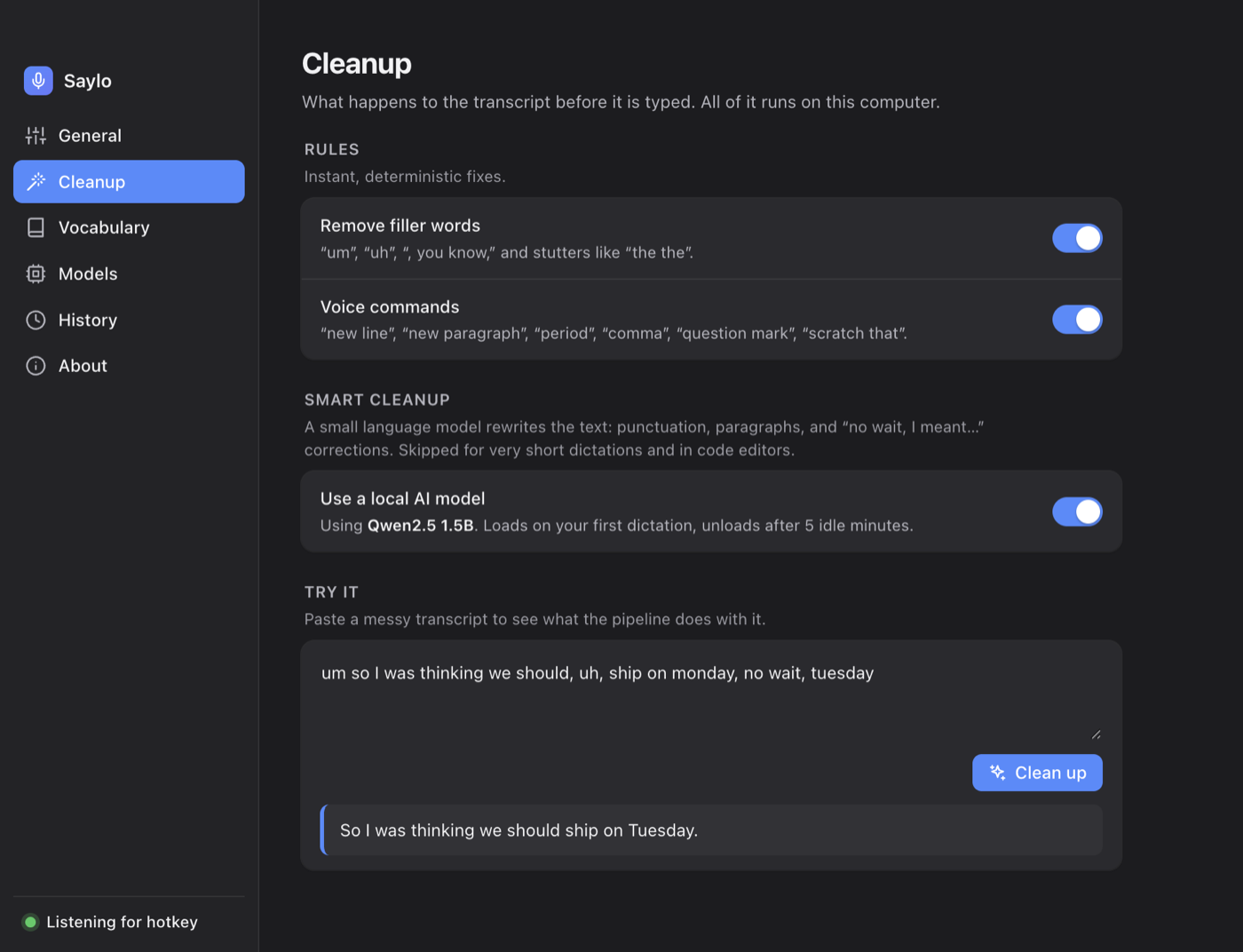
“Um”, “uh”, “you know”, and the doubled words that come out when you're thinking. Instant and rule-based, so it costs nothing.
Hold a key, talk, let go. Saylo types the finished sentence into whatever app has focus — filler words gone, punctuation added, “no wait, I meant Tuesday” already sorted out. Every bit of it runs on your own machine.
Free · works the moment it opens · macOS 12+ and Windows 10/11
Saylo lives in your menu bar or tray and waits for one key. There's nothing to open and nothing to switch to.
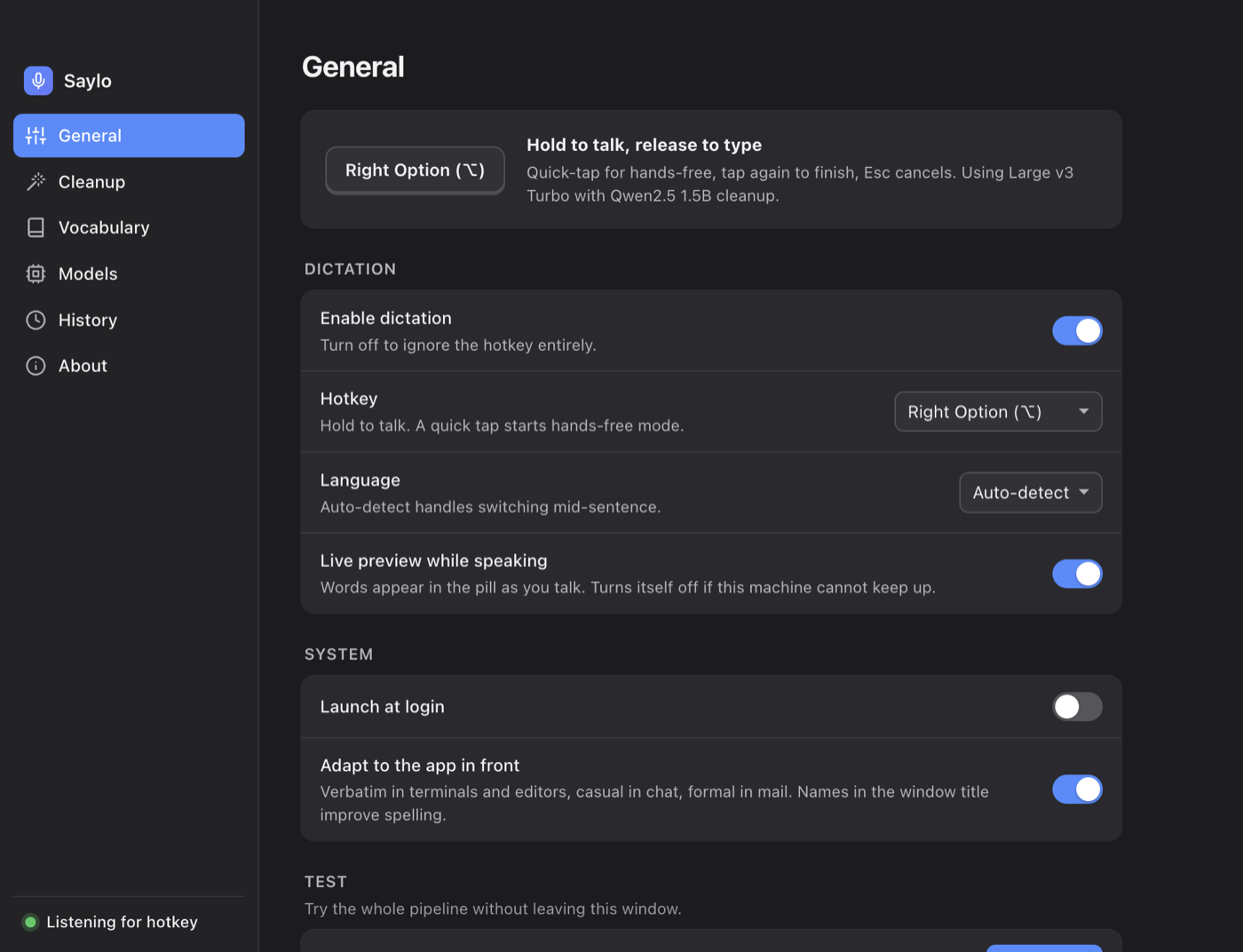
Press and hold Right Option (Right Alt on Windows) anywhere. A small pill appears at the bottom of your screen so you know it's listening.
Talk naturally. The waveform reacts to your voice. Speak in English, Hindi, Spanish, Japanese and more — or let Saylo detect the language.
Release the key. Your words are transcribed on your own machine and typed into the app you were already in, cursor and all.
Prefer hands-free? Quick-tap the key to start, tap again to finish. Press Esc to cancel.
Nobody speaks in clean prose. Saylo removes the hesitations, applies your corrections and punctuates the result before a single character is typed — on your machine, in about half a second.
um so I was thinking we should, uh, ship on monday, no wait, tuesday, because the the tests are not done
So I was thinking we should ship on Tuesday, because the tests are not done.
“Um”, “uh”, “you know”, and the doubled words that come out when you're thinking. Instant and rule-based, so it costs nothing.
Say “scratch that” and the last sentence disappears — that one is instant and always on. Say “Monday, no wait, Tuesday” and the optional local AI model works out that you meant Tuesday; Saylo switches it on automatically when your machine has the memory for it.
Commas, full stops, question marks and paragraph breaks appear where they belong. Or say “new paragraph”, “open quote”, “question mark” and place them yourself.
Dictation that formats a shell command like an email is worse than no dictation. Saylo checks what's in front before it types.
Prefer it not to look? One switch turns the whole thing off.
git rebase --onto main feature/searchSaylo picks sensible models for your hardware on first launch. Everything below is there when you want it, not in your way when you don't.
Screenshots show sample dictations.
Everything you'd expect from a paid cloud dictation app, without the account, the subscription or the upload.
Saylo types wherever your cursor is: code editors, browsers, terminals, Slack, Notion, email. If you can type there, you can dictate there.
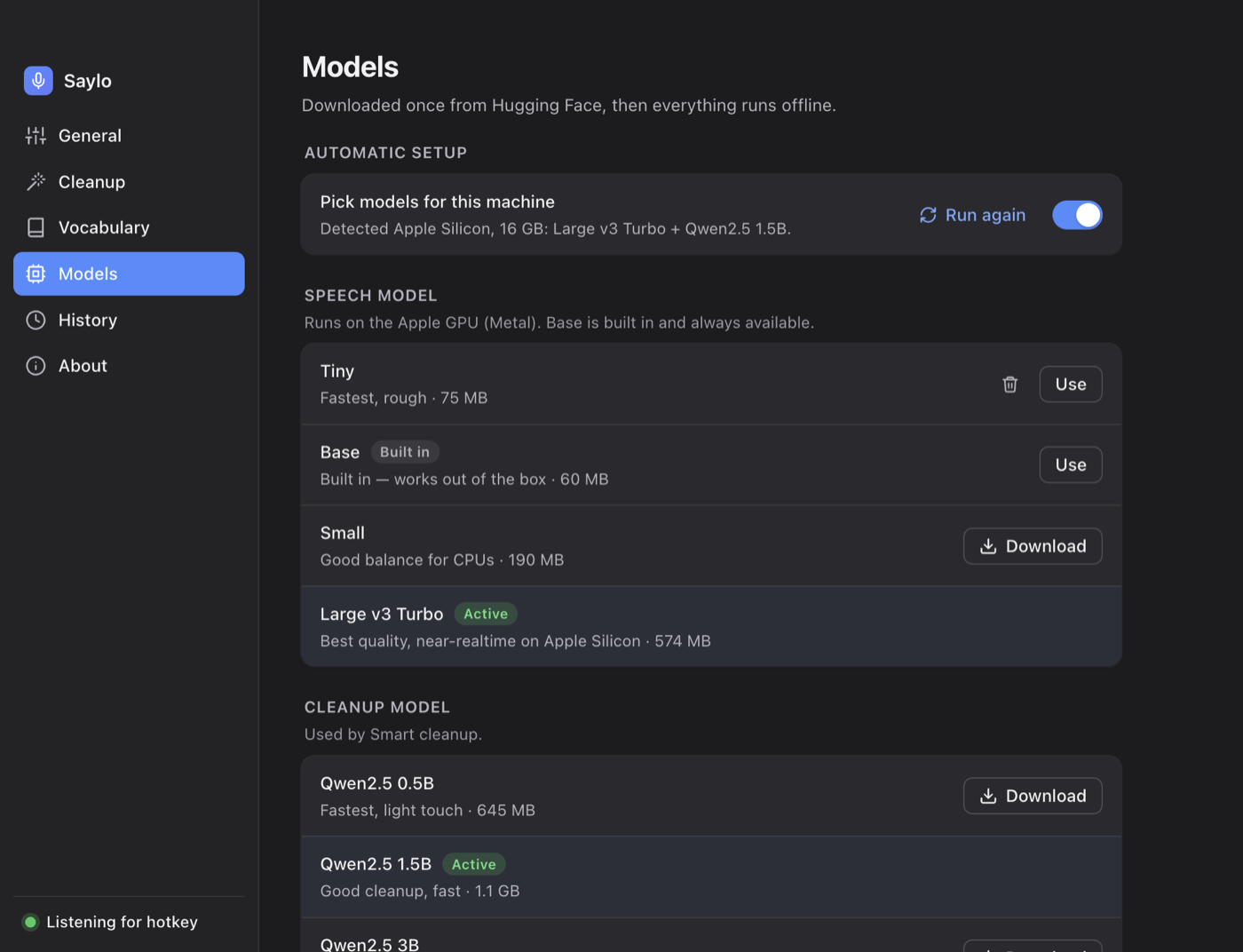
A speech model ships inside the installer, so dictation works the first time you press the key. Saylo then sizes up your machine and fetches a better model in the background.
Add the names, products and jargon you use and Saylo spells them right — capitalisation included. Map a spoken shortcut to any text, like your email address.
Words appear in the pill while you're still talking, so you know it heard you before you let go of the key.
Speech recognition and the cleanup model both run as local processes on your CPU or GPU. There is no server to send audio to, so there's nothing to leak, log or subpoena.
Models unload after a few quiet minutes and load again on your next dictation. Silence is skipped before transcription, so long pauses cost nothing.
Dozens of languages, including English, Hindi, Spanish, French, German, Japanese and Chinese. Pick one for best accuracy or leave it on auto-detect.
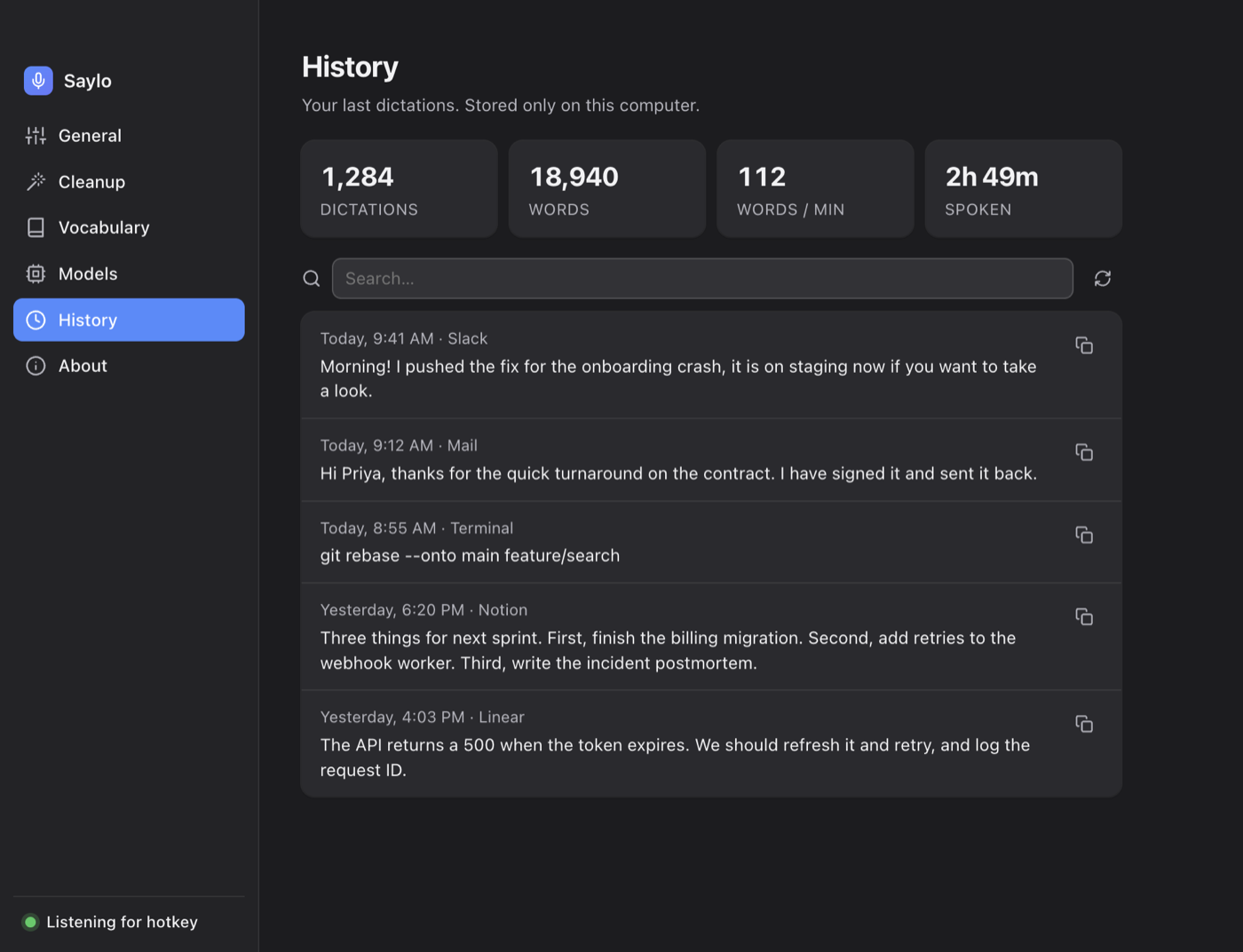
Every dictation is kept in a plain file on your disk, searchable from Settings, with your word count and speaking speed. Delete the file and it's gone.
Saylo makes exactly two kinds of network request, and neither one carries anything about you: downloading a model, and checking whether a new version exists. Both are listed below and the update check can be switched off. Everything else — recognition, cleanup, history — happens on your machine. Verify it yourself: turn Wi-Fi off and keep dictating.
127.0.0.1 on a random port — nothing is exposedThe two requests in full: model files from Hugging Face when you (or first-run setup) download one, and a version check against saylo.dev every few hours, which sends no identifiers and is one switch away from off.
Saylo picks a sensible pair on first launch. Override either one from Settings whenever you like; the engine reloads in a few seconds.
| Speech model | Size | Best for | Quality |
|---|---|---|---|
| Base Built in | 60 MB | Ships inside the app — works before you download anything | |
| Small | 190 MB | Older laptops and machines without a GPU | |
| Large v3 Turbo Recommended | 574 MB | Apple Silicon and modern PCs — near-realtime |
| Cleanup model optional | Size | Best for | Rewrites |
|---|---|---|---|
| Qwen2.5 0.5B | 645 MB | Machines with less memory to spare | |
| Qwen2.5 1.5B Recommended | 1.1 GB | 16 GB of RAM or more — about half a second per dictation | |
| Qwen2.5 3B | 2.0 GB | The best rewrites, if you can spare the time and memory |
You don't have to choose. On first launch Saylo checks your processor and memory, picks a pair that fits and downloads them in the background while you're already dictating with the built-in model.
Free, no account. A speech model is built into the installer, so you can dictate the moment it opens.
Universal — Apple Silicon & Intel
Saylo isn't notarized with Apple yet, which is why Gatekeeper asks. Terminal alternative: xattr -dr com.apple.quarantine /Applications/Saylo.app
64-bit installer · Windows 10 or 11
The installer isn't code-signed yet, which is why SmartScreen asks. Windows Defender may take a moment on first launch.
Looking for an older version or the changelog? Release notes · Need help? Contact support
On Linux? A build exists but hasn't been tested on real hardware yet — get in touch if you'd like to try it.
Turn Wi-Fi off and dictate — it works, cleanup included. Saylo makes two kinds of network request and nothing else: model downloads that you or first-run setup trigger, and a version check against saylo.dev that you can switch off in Settings. Neither sends anything about you. Both engines run as local processes bound to 127.0.0.1 on a random port.
No. It's a small language model (Qwen2.5) that runs on your own machine through llama.cpp, exactly like the speech model does. Your words never leave the computer. It loads on your first dictation, takes roughly half a second, and unloads after five idle minutes so it isn't sitting in memory all day. You can turn it off and keep the instant rule-based cleanup instead.
No. A 60 MB speech model is built into the installer, so the first press of the hotkey works. In the background Saylo looks at your processor and memory, picks a better pair of models and switches over quietly when they finish downloading. You can skip all of that and choose models yourself.
No. Saylo checks which app is in front. In terminals and code editors it types exactly what you said, with no capitalisation and no rewriting. Chat apps get a casual tone, mail clients a more formal one. One switch turns app-awareness off entirely.
Because Saylo is not yet notarized through Apple's Developer Program. The app is signed, just not with an Apple-issued certificate. Approving it once under Privacy & Security → Open Anyway is enough; you won't be asked again.
Two reasons: to notice when you press the hotkey while another app is in front, and to type the result into that app. Saylo never reads what you type — it only listens for the single key you chose.
With Large v3 Turbo, comparable to the best cloud services for clear speech in supported languages. Add the names and jargon you use to the vocabulary list and they'll be spelled correctly too. Smaller models trade accuracy for speed and memory; you can switch any time and compare with the built-in test recorder.
Any Mac from 2013 onward running macOS 12+, or a 64-bit Windows 10/11 PC. Apple Silicon Macs get GPU acceleration and feel instant. On Intel Macs and Windows, Saylo uses all CPU cores and picks a smaller model to match. AI cleanup is only switched on automatically when you have the memory for it.
Yes: Right Option/Alt, Right Command/Windows, Right Control, F5 or F6. Hold to talk, quick-tap for hands-free, Esc to cancel.
Only in a plain file inside Saylo's local data folder on your computer, so you can search it and copy earlier dictations again. Delete it whenever you like. Nothing is synced and nothing is uploaded.
There's no account system, no licence check and no server to bill you from — so there's nothing to switch on later for software you've already installed. Future versions may be paid; the build you download stays yours and keeps working offline.
Free, no account, and dictating within a minute of the download finishing.
Download Saylo